Visitor Live Ticker API key
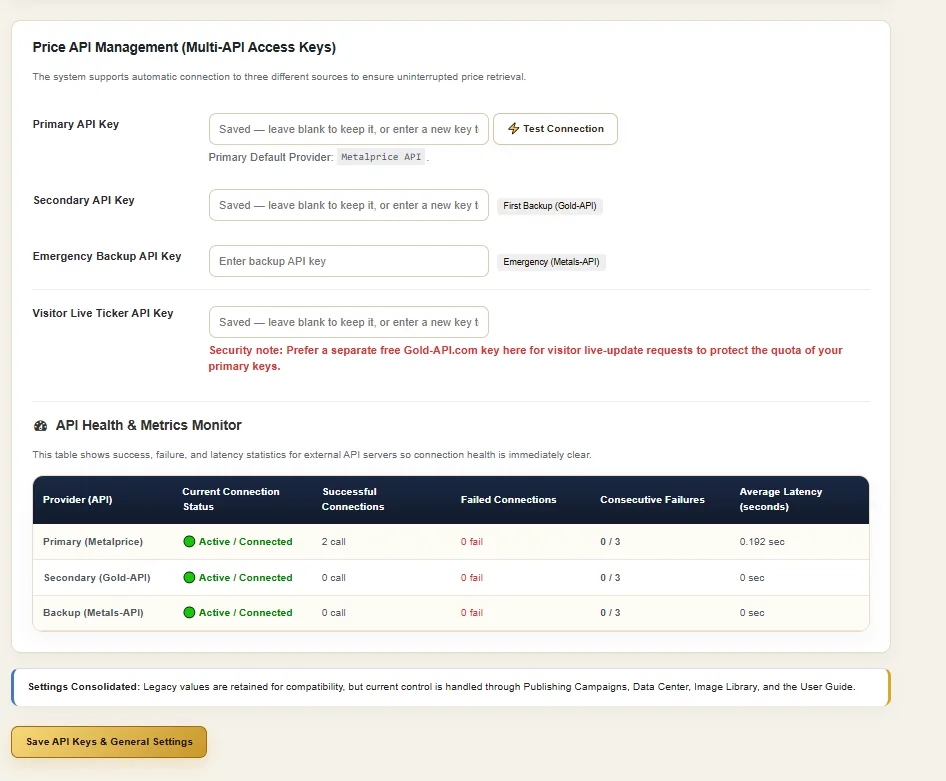
The current API settings include a dedicated key field for visitor live-update requests, separated from the primary publishing/data key roles.
GMIP connects gold-price data to a wider WordPress operating workflow. Configure primary and backup price-source roles, keep a separate key for visitor live-update requests, inspect provider health, preserve market readings and use the same data layer inside scheduled price and publishing campaigns.
This distinction matters. A website visitor asking for a current price is not the same operational task as a WordPress campaign that refreshes stored market data, updates a page or publishes a report. GMIP exposes those roles separately instead of treating every price request as one identical process.
The current API settings include a dedicated key field for visitor live-update requests, separated from the primary publishing/data key roles.
The Gold Data & Reports Center keeps market readings and reporting history inside the WordPress operation.
Campaigns can use price data for Price Updates Only or for recurring national, city and weekly publishing workflows.
GMIP does not need an exaggerated tick-rate claim to explain its value. The current product interface proves a separate visitor live-update access path and scheduled campaign operations. Actual request frequency and freshness also depend on the configured external data provider and the workflow used by the website.
The current Price API Management screen separates the data layer into four visible roles. That lets administrators manage the main data path, backup paths and visitor live-update access independently.
The principal configured external provider used by the system.
A separate configured source role available alongside the primary connection.
An additional fallback key field for price-source continuity.
A separate key role specifically labeled for visitor live-update requests.
GMIP manages these configured API keys inside WordPress. The product interface does not present GMIP itself as the external precious-metals data provider.
The same API screen includes an API Health & Metrics Monitor. Instead of showing only saved keys, it exposes operational information that helps an administrator see whether configured provider roles are connecting and how those connections are behaving.
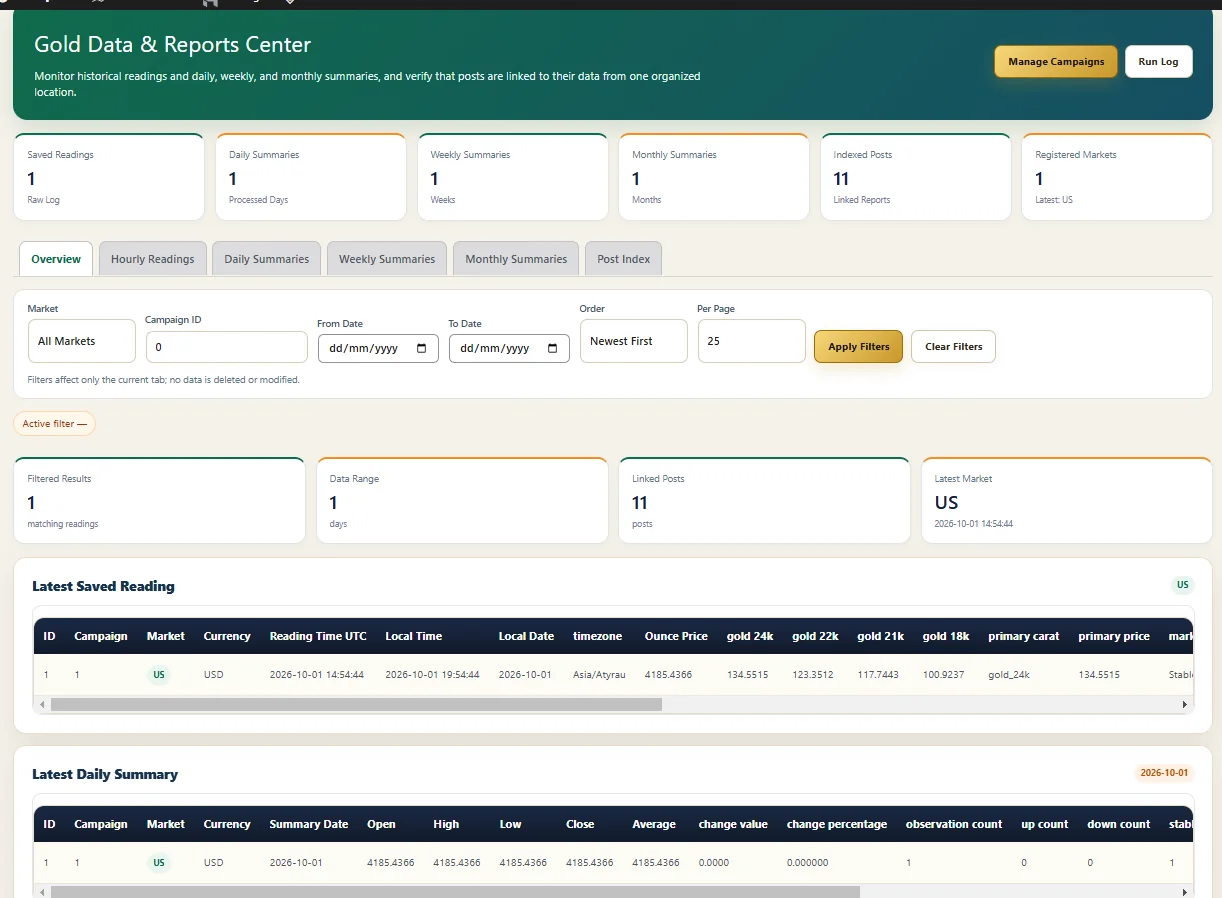
GMIP also maintains a Gold Data & Reports Center. The current interface shows saved readings, daily, weekly and monthly summary counts, indexed posts, registered markets and a latest saved reading table with market, currency, timestamps and gold-price fields.
A visitor-facing current price answers “what is the price now?” The Data & Reports Center supports a different operational question: “what readings and summaries has the publishing system retained and connected to its reporting workflow?”
GMIP visibly separates the visitor live-ticker access role from campaign scheduling. That allows the page to target “live gold price plugin” searches without pretending that every publishing operation runs at visitor-request frequency.
The API settings include a dedicated Visitor Live Ticker API key field and a security note recommending a separate key for visitor live-update requests so the primary keys are not consumed by that traffic.
GMIP campaigns control recurring WordPress work such as price refreshes and publishing. The current campaign interface shows an active example with automatic price refresh every 3 hours, while the campaign architecture supports manual and recurring scheduling models.
Once price data is available to the system, campaigns determine how that data participates in the wider publishing workflow. This is where GMIP separates itself from a simple display-only gold price widget.
Configured provider role supplies market data.
Price-source roles and health remain visible in WordPress.
Defines market, content mode and schedule.
Refresh price data or run the selected publishing workflow.
Update the relevant page/data context or publish configured content.
Review status, pending tasks and run history.
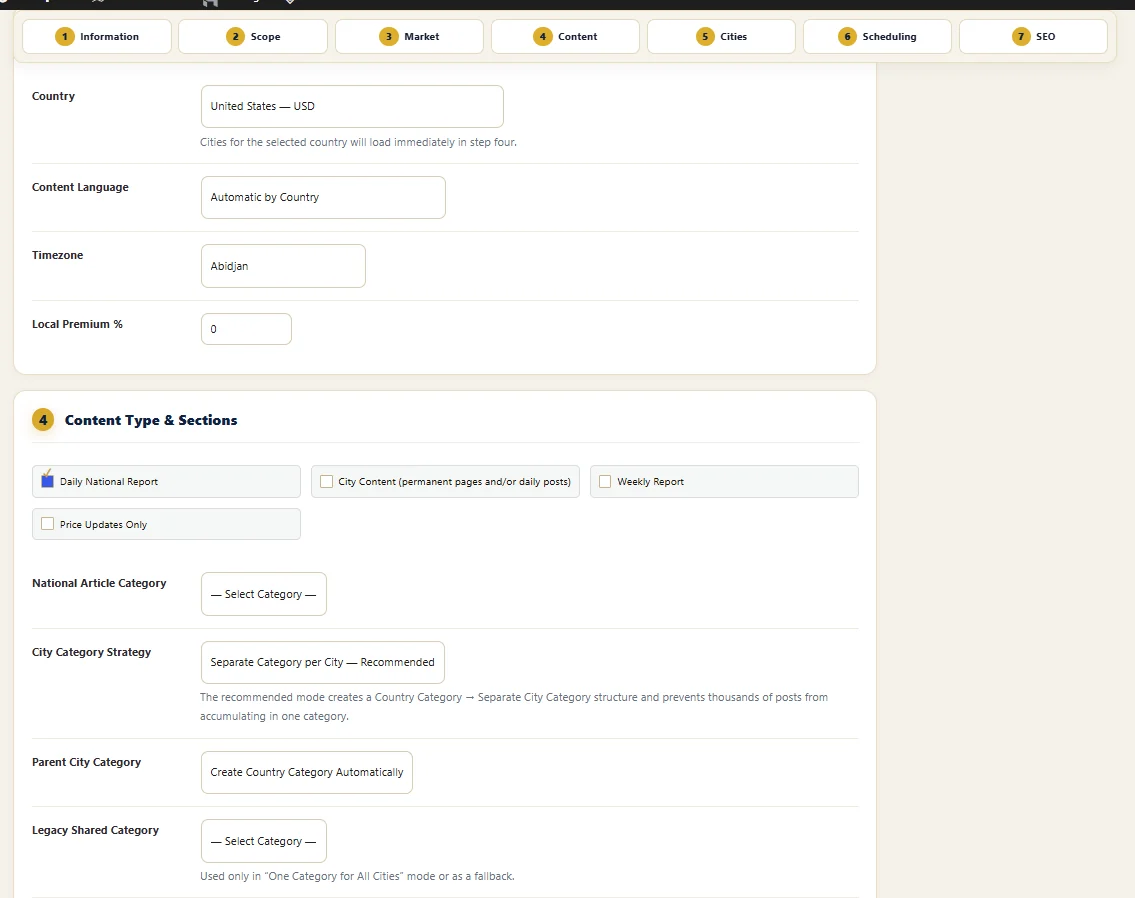
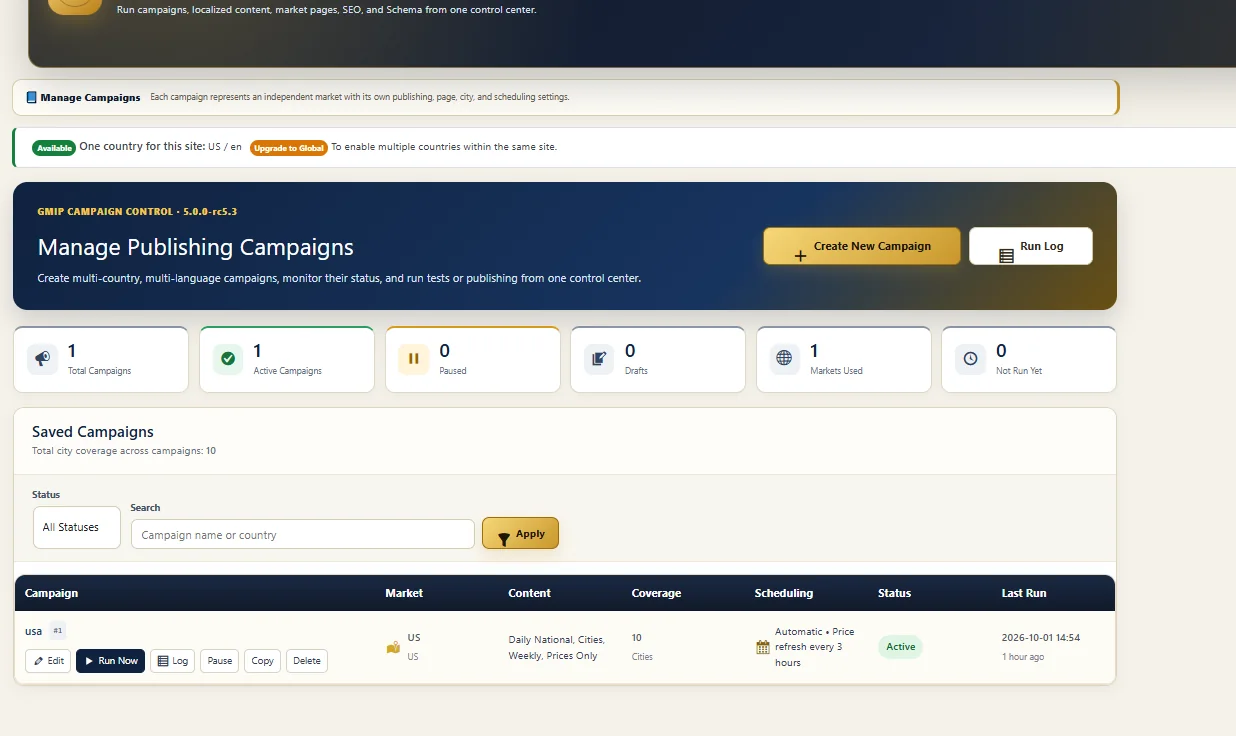
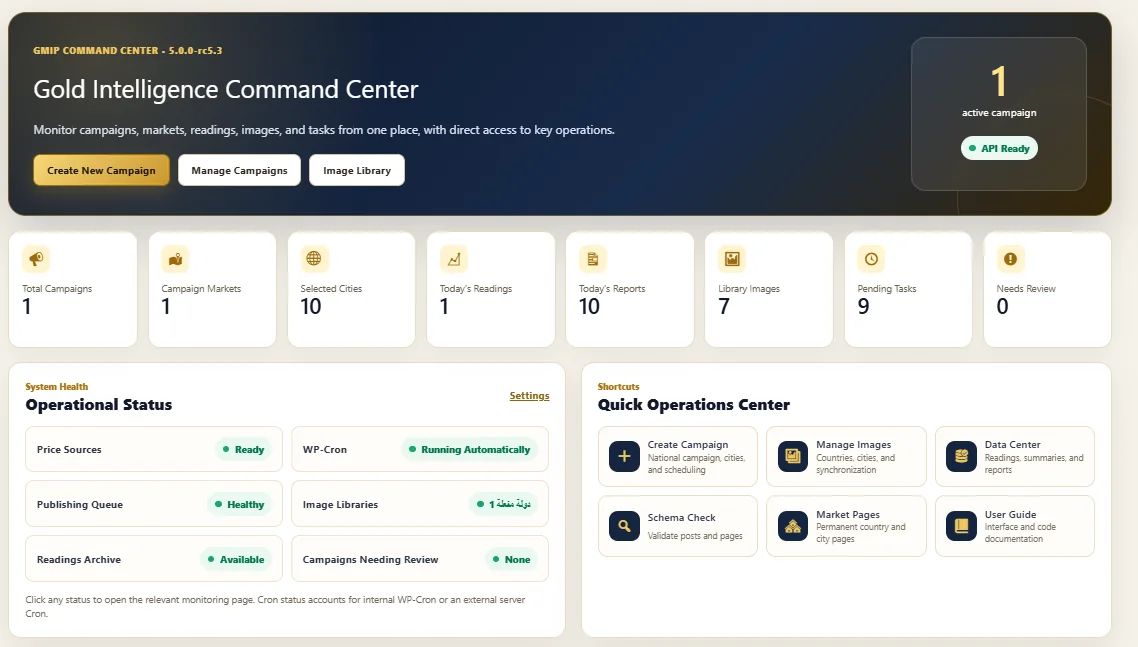
The Gold Intelligence Command Center exposes Price Sources, WP-Cron, Publishing Queue, Readings Archive, image status, campaign review state and pending tasks alongside campaign and market metrics. This lets the administrator see the live-data layer in the context of the wider WordPress operation.
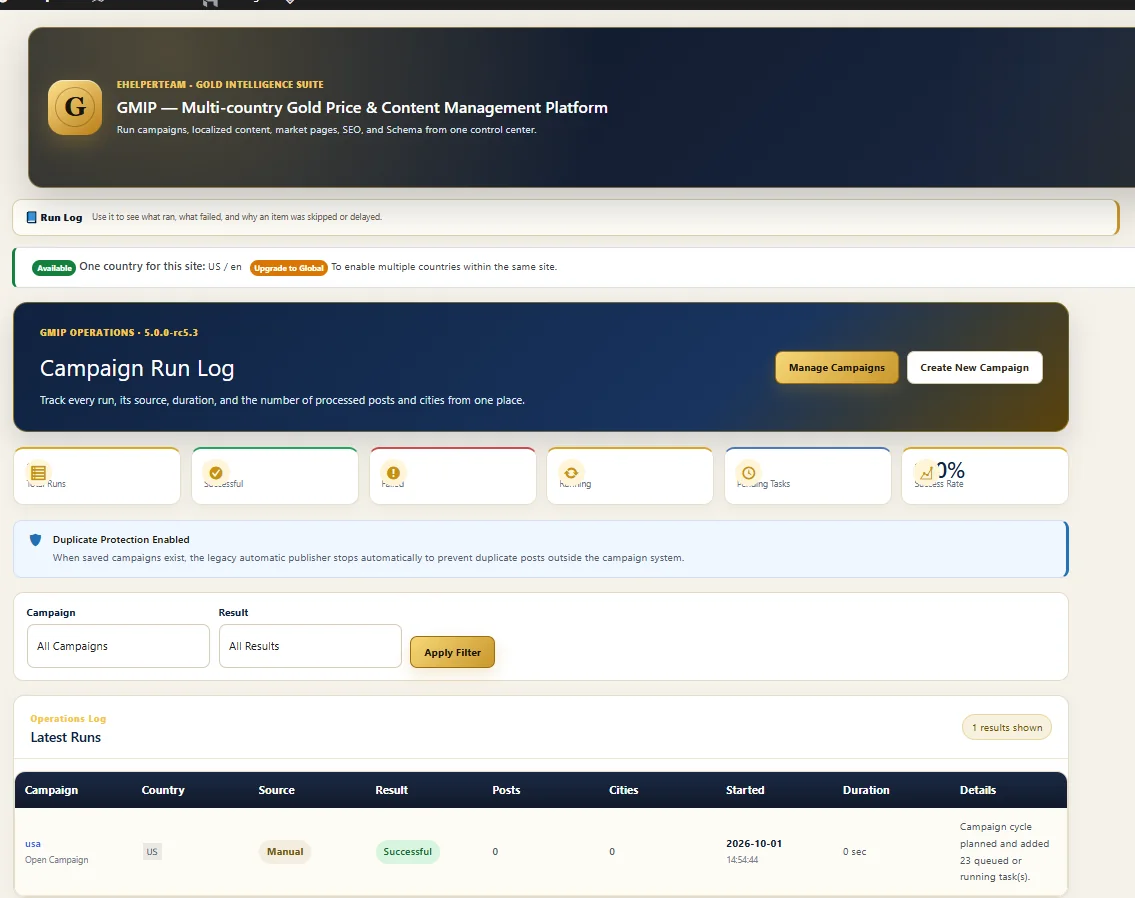
API health explains the price-source connection. The Campaign Run Log explains what happened when a scheduled or manual campaign actually ran. The current interface shows campaign, country, source, result, posts, cities, start time, duration and execution details, plus Duplicate Protection status.
Together, API health and run history give administrators visibility into two different failure domains: the external data connection and the WordPress campaign execution.
Explore automatic gold price updates in detail →Use the dedicated visitor live-update API role as part of the website's current-price presentation.
Connect price data to Price Updates Only workflows when the job is maintenance rather than new publishing.
Use price data inside national, city and weekly report workflows managed through campaigns.
Use the Gold Data & Reports Center to inspect saved readings and reporting history inside the operation.
GMIP includes a gold-price data layer with configurable external API roles, a separate Visitor Live Ticker key, saved readings and campaign-based price and publishing workflows. It is broader than a basic display-only live-price widget.
No fixed tick frequency is claimed here. The current interface proves a dedicated visitor live-update API role and separate scheduled campaign workflows. Actual freshness also depends on the configured external price-data provider and the way the website uses that data.
Yes. The current Price API Management interface includes Primary, Secondary and Emergency Backup API key roles, plus a separate Visitor Live Ticker key.
The API Health & Metrics Monitor shows current connection status, successful connections, failed connections, consecutive failures and average latency for configured provider roles.
The current Gold Data & Reports Center shows saved readings and separate views for Hourly Readings, Daily Summaries, Weekly Summaries, Monthly Summaries and a Post Index.
This page does not make that claim. GMIP provides the WordPress management layer for configured external API keys and connects the resulting price data to the rest of its publishing system.
The Visitor Live Ticker role is for visitor live-update requests. Automatic campaign updates are scheduled WordPress operations such as Price Updates Only or recurring content workflows. They are related through the same product but serve different operational purposes.
Use the main GMIP pricing section as the pricing source of truth. This page deliberately focuses on the live-price and price-source management layer.
Use GMIP to connect price-source management, live visitor access, stored market readings, scheduled updates and publishing operations inside one WordPress product.